If there is one adage that I like to use often, it is "better late than never." That sums up why I am writing up this lesson a full year late, if not longer. My apologies! But let me try to explain...
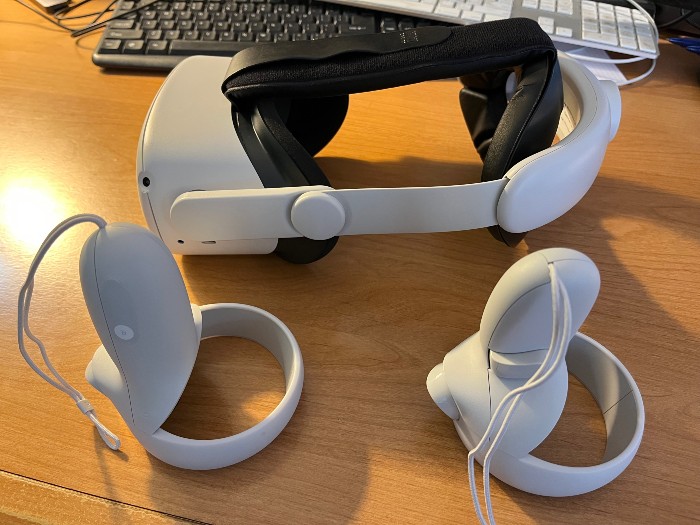
I bought the Meta Quest 2 VR device at least a couple of years ago. At the time, I wanted to dive into the world of Virtual Reality and see what the latest technology had to offer. I just started reading Jaron Lanier's book Dawn of the New Everything, and so I was pretty stoked about VR at the time.
So I identified two devices of interest. One was the Apple Vision Pro, the state-of-the-art VR headset. I wrote a lesson on that a while back. The other device I wanted to focus on was the most affordable VR device, the Meta Quest 2. At that time the name of the Meta VR product was Oculus Quest 2. Oculus was an independent company until 2014, when Meta bought the company. Meta slowly rebranded the Oculus device, and by the end of 2022 had completely removed the Oculus branding.
In the first few weeks after I bought the Quest 2, I used it almost every day. At the time I had not seen the Apple Vision Pro as it was not out yet. The Quest 2 was what I understood to be the best VR device for the price. I still think that's true. When I bought it initially, it cost roughly $250, if my memory serves. Today, on Amazon you can pick it up for $279, which is not bad considering inflation and the perceived improvements that would be included in today's updated model.
What did I find? Well, when you fire it up, it lands you in a VR environment that resembles the inside of a very modern home. This rendering is not the only one available. There are others that are just as fascinating. As you swivel your head around, you can see the scenery change, as if you are really in the room. It took a little getting used to. I thought it was fantastic. The resolution of the screen was fairly good, and it does really fool the mind into thinking you are in a virtual world.
You will also notice a floating panel that serves as a menu of sorts. Choices range from the web browser, settings, library, and other options that you can choose from. You choose by using one of your Quest 2 controllers, which are handheld devices that have some buttons and triggers on them for you to use when you are navigating the device, or playing a game.
Note that you must be connected to the Internet, normally via a WiFi connection, to do practically anything. So that will be one of the first things you will configure after you fire it up for the first time.
There is also a symbiotic relationship between the VR device and your smart phone, which is required to have the Meta app installed. Meta Quest 2 requires the Meta Horizon mobile app (formerly the Oculus app) to be installed on a smartphone for initial setup and some ongoing functionality. While the app is primarily used for setup and managing device settings, it also enables features like casting your VR experience to your phone and purchasing apps.
My favorite game on the Quest 2 is Thrill of the Fight, which is a boxing game that is realistic enough, and can give you a great workout. When we had some teenage relatives over, I showed them this game and they loved it.
Sure, I played some other games, explored Meta Horizon Worlds, and poked around the device quite a bit in the beginning, but to be honest, it lost its luster fairly quickly. It became something that was just gathering dust on the shelf. I'd dust it off occasionally for guests to play with, but that was not very often.
To give you an idea of how long it has been since I played with it, I started it up yesterday and one of the controllers did not work. It turned out that the battery had leaked and ruined the right hand controller. So now I only have a left-hand controller that works. And oddly, that prompted me to write this lesson, knowing that this thing is one step away from being sold on eBay at a very cheap price.
Would I recommend buying a new one? Well, yes, if you're curious about VR, sure. You can pick the newer Quest 3 up on Amazon for around $499 for the bare-bones package. The price goes up from there for additional accessories.
Personally, I'll wait around until the Apple device price comes down before I buy another VR product. Maybe then I recapture my enthusiasm for VR.
Vocabulary
Flash Card Drill-
The adage "practice makes perfect" encourages people to keep improving.「習うより慣れよ」という格言は、人々が努力を続けるよう励ましている。
-
He often repeats the adage that honesty is the best policy.彼はよく「正直は最善の策だ」という格言を口にする。
-
She was stoked about her first concert ticket.彼女は初めてのコンサートチケットにとても興奮していた。
-
I'm stoked to start my new job next week.来週から新しい仕事を始めるのがすごく楽しみだ。
-
The company opened a state-of-the-art research center.その会社は最先端の研究センターを開設した。
-
This laptop has state-of-the-art security features.このノートパソコンには最新鋭のセキュリティ機能がある。
-
Strong branding helped the startup stand out in a crowded market.強いブランディングのおかげで、その新興企業は競争の激しい市場で目立つことができた。
-
The designer focused on branding to make the new product memorable.そのデザイナーは新製品を印象に残るものにするため、ブランディングに注力した。
-
This painting resembles the artist's early work.この絵はその画家の初期の作品に似ている。
-
He resembles his father in both appearance and voice.彼は見た目も声も父親によく似ている。
-
The rendering of the 3D model took several minutes.その3Dモデルのレンダリングには数分かかった。
-
Her rendering of the poem captured its sadness perfectly.彼女のその詩の描写は、その悲しさを見事に捉えていた。
-
She is navigating the city with the help of a map.彼女は地図を使ってその街を進んでいる。
-
Navigating a new workplace can be challenging at first.新しい職場に慣れるのは最初は大変かもしれない。
-
You need to configure the printer before using it.使う前にプリンターを設定する必要がある。
-
The technician configured the app to send notifications.技術者は通知を送るようにそのアプリを設定した。
-
He started boxing when he was a teenager.彼は10代の頃にボクシングを始めた。
-
Boxing requires strength, speed, and discipline.ボクシングには、力、速さ、そして規律が必要だ。
-
We stayed in a bare-bones apartment while we were traveling.旅行中、私たちは最低限の設備しかないアパートに泊まった。
-
The first version of the app was bare-bones but functional.そのアプリの最初のバージョンは簡素だったが、十分に使えた。